
Introduction
Managing a website with hundreds or thousands of URLs can be challenging, especially when new pages are published regularly. You might operate a WordPress blog, an e-commerce store, a directory website, or a large business portal where new pages need to be discovered by Google.
When you have only a few URLs, Google Search Console's URL Inspection tool is useful for checking individual pages and requesting indexing. However, manually inspecting hundreds of URLs one by one is time-consuming and difficult to maintain at scale.
This is where bulk URL submission becomes useful.
A well-planned bulk submission workflow helps Google discover important pages through XML sitemaps, internal links, and other supported methods. It also helps website owners identify technical problems, remove unwanted URLs from submission lists, and monitor indexing progress more efficiently.
In this guide, you'll learn how to submit multiple URLs to Google, manage websites with 100 to 10,000+ URLs, understand Search Console's request limits, and choose appropriate tools like a Bulk URL Indexer for bulk URL management.
One important distinction: submitting a URL tells Google about a page; it does not guarantee that Google will crawl or index it. Google's own documentation recommends using URL Inspection for a few URLs and sitemaps when dealing with larger numbers of URLs.
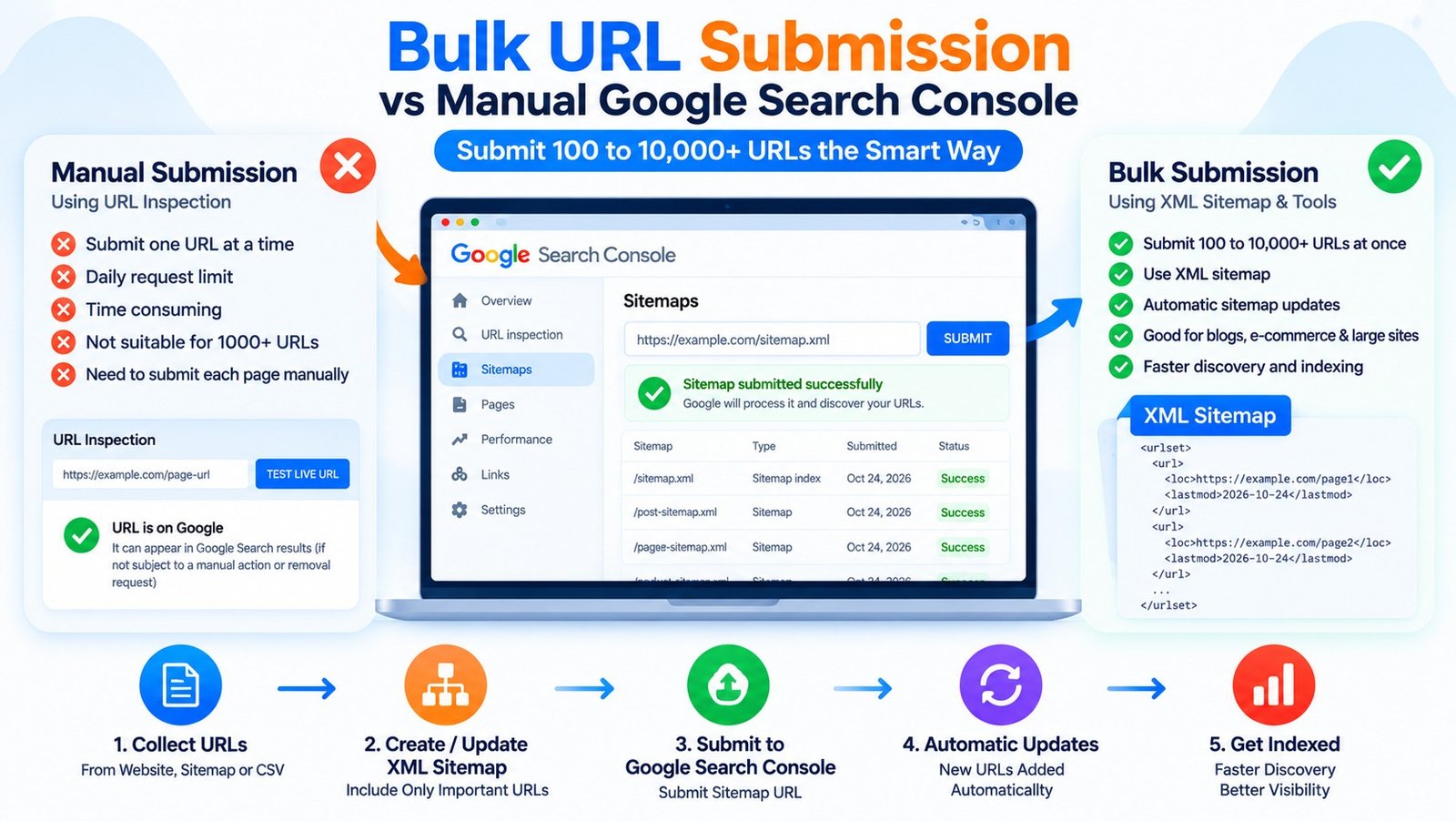
📷 Bulk URL Submission vs Manual Google Search Console — Submit 100 to 10,000+ URLs the Smart Way
What Is Bulk URL Submission?
Bulk URL submission is the process of providing search engines with information about multiple website URLs through supported discovery and submission methods.
Instead of manually entering each URL into Google Search Console, website owners can maintain an XML sitemap containing their preferred, indexable URLs and submit that sitemap to Google.
For example, imagine an e-commerce website with 2,500 product pages. Manually inspecting every product URL would require considerable effort. An automatically updated product sitemap provides a more scalable way to help Google discover those URLs.
A Bulk URL Submission Tool may help collect, validate, organize, or submit URL lists through supported methods. Its actual capabilities depend on the software.
However, bulk submission and bulk indexing are not the same thing. A URL can be submitted successfully but remain outside Google's index because of content quality, duplication, canonical selection, technical restrictions, or other indexing decisions.
Google's official guidance explains that sitemaps are particularly useful when you need to notify Google about many URLs. Read Google's recrawl documentation.
Why Manual Google Search Console Submission Is Difficult at Scale
Google Search Console provides a URL Inspection tool that allows eligible users to inspect a page and request indexing.
This is useful for an important new article, a recently updated landing page, or a technical issue affecting a specific URL. However, individual URL requests have daily quotas, and repeated requests for an unchanged URL do not make Google crawl it faster.
When managing thousands of pages, manual submission can create several problems:
- Time spent entering URLs individually.
- Difficulty prioritizing important pages.
- Repeated submissions without meaningful changes.
- Limited visibility into large URL collections.
- Missed technical issues across page templates.
- Poor tracking of pages that are already indexed or should not be indexed.
Google recommends submitting a sitemap when you have many URLs to make discoverable. You can review the official URL Inspection tool documentation.
What Is the Google Search Console Request Indexing Limit?
Google imposes quotas on individual indexing requests made through URL Inspection. The exact limits can depend on the applicable system quotas, and website owners should check the current documentation rather than rely on a fixed number circulating online.
The important point is that URL Inspection is not designed as a mechanism for submitting thousands of URLs individually.
If you need to manage hundreds or thousands of URLs, use a sitemap-based workflow and focus individual inspection requests on important pages that need diagnosis or have recently changed.
Do not attempt to bypass Google's quotas by creating multiple accounts or automating prohibited submission methods.
How to Submit Bulk URLs to Google: Step-by-Step Guide
Follow this process to manage bulk URL submission for websites of different sizes.
Step 1: Collect All Important URLs
Begin by collecting the URLs you actually want Google to discover and potentially index.
Depending on your website, you can collect URLs from:
- Your XML sitemap (using an XML Sitemap URL Extractor).
- Your WordPress posts and pages.
- Your product database.
- Your category and service pages.
- Your website's internal links.
- Your content management system.
- Your website crawl reports.
For a large website, export the URLs into a spreadsheet so that you can review them before submission.
Useful columns include:
| Column | Purpose |
|---|---|
| URL | Complete page address |
| Page type | Blog, product, category, or service |
| HTTP status | Identifies working pages and errors |
| Canonical URL | Shows the preferred URL |
| Sitemap status | Indicates whether the URL is included |
| Indexing status | Records the latest available inspection result |
| Priority | Helps identify important pages |
| Last updated | Records a genuine content update |
This initial review prevents you from submitting thousands of irrelevant, duplicate, or broken URLs.
Step 2: Remove Unwanted URLs
Before submitting a large URL list, remove pages that should not appear in Google Search.
Examples include:
- URLs returning 404 or 410 responses.
- Redirected URLs when the final destination is the preferred page.
- Duplicate URLs with an established canonical version.
- Internal search-result pages that are not intended for indexing.
- Filter combinations that generate large numbers of near-identical pages.
- Pages intentionally marked
noindex. - Private or login-protected pages.
Do not remove a page simply because it is currently not indexed. First determine whether it is useful, technically eligible, and intended to appear in search results.
A clean URL list makes your submission workflow more efficient and reduces unnecessary crawling.
Step 3: Create or Update Your XML Sitemap
An XML sitemap is the recommended starting point for helping Google discover large numbers of URLs.
A simple sitemap entry looks like this:
<?xml version="1.0" encoding="UTF-8"?>
<urlset xmlns="http://www.sitemaps.org/schemas/sitemap/0.9">
  <url>
    <loc>https://example.com/blog/seo-guide/</loc>
    <lastmod>2026-10-20</lastmod>
  </url>
  <url>
    <loc>https://example.com/services/seo/</loc>
    <lastmod>2026-10-22</lastmod>
  </url>
</urlset>
Replace the example URLs with your actual pages.
The lastmod value should reflect the page's genuine last significant update. Do not change the date simply to encourage repeated crawling.
For large sites, split the URLs across multiple sitemap files and use a sitemap index file to reference them.
According to Google's sitemap guidance, an individual sitemap is limited to 50,000 URLs or 50 MB when uncompressed, whichever limit is reached first.
Official resource: Build and submit a sitemap.
Step 4: Submit the Sitemap in Google Search Console
Once your sitemap is available, open Google Search Console and select your verified website property.
Follow these steps:
- Open the Sitemaps section.
- Enter the sitemap URL or sitemap index URL.
- Click Submit.
- Review the sitemap processing status.
- Check for errors or warnings.
- Monitor the Page Indexing report to understand how your pages are being processed.
For example, a WordPress website might use a sitemap index at:
https://example.com/sitemap_index.xmlThe actual sitemap address depends on your SEO plugin or website configuration.
Submitting a sitemap does not mean every listed page will be indexed. Google uses sitemaps as discovery signals, and it still evaluates the individual URLs.
Step 5: Automate Sitemap Updates
For websites that publish content regularly, manually updating a URL list is unnecessary if the content management system already generates a sitemap.
If you're using WordPress with Rank Math or Yoast SEO, verify that the sitemap is enabled and that it includes the correct public post types.
For an e-commerce website, check whether your product and category sitemaps update when products are published, modified, or removed.
Automation can help ensure that new URLs become discoverable without requiring a manual submission every time a page is created.
Avoid repeatedly resubmitting an unchanged sitemap multiple times per day. Focus instead on keeping it accurate and ensuring that important pages are linked internally.
Step 6: Use URL Inspection for Important Pages
Although sitemaps are suitable for large URL collections, individual URL Inspection remains useful when a particular page needs investigation.
Use it for pages such as:
- A newly launched service page.
- An important product page that remains unindexed.
- A blog post that recently received a substantial update.
- A page showing an unexpected indexing status.
- A URL with a suspected canonical or accessibility problem.
Inspect the page, review the reported status, and run a live test when appropriate. Request indexing if the page is eligible and the request is justified.
Do not spend time submitting every URL individually when the same issue can be resolved at the sitemap or website-template level.
Step 7: Monitor Indexing Progress
After submitting your sitemap, monitor the Page Indexing report and inspect selected URLs.
Track the following:
- URLs discovered by Google.
- URLs currently indexed.
- Pages excluded from indexing.
- Pages with crawl or server errors.
- Duplicate pages and canonical differences.
- Important pages that remain unindexed.
A URL may take days or longer to be crawled and assessed. Google does not guarantee that every submitted page will be included in search results.
If a large group of pages has the same problem, investigate the common cause instead of submitting each URL again.
How to Manage 100, 1,000, or 10,000+ URLs
The right workflow depends on the size and structure of your website.
For 100 URLs
Start with a clean list of canonical, indexable URLs.
- Validate the URL list.
- Remove duplicates and broken URLs.
- Ensure that all important pages are included in the sitemap.
- Submit the sitemap in Search Console.
- Inspect a small number of high-priority pages individually.
- Monitor the resulting status changes.
For a small site, this process is often sufficient without a paid bulk indexing product.
For 1,000 URLs
At this size, automation and grouping become more useful.
Separate the URLs by page type, such as blog posts, product pages, categories, and service pages.
Check whether the sitemap updates automatically and whether the website has unnecessary URL variations. Review recurring problems across templates, such as incorrect canonical tags or unintended noindex directives.
Prioritize URLs based on their business value, uniqueness, and technical eligibility rather than submitting all pages indiscriminately.
For 10,000+ URLs
Large sites need a more systematic process.
- Generate sitemap files automatically.
- Use a sitemap index where necessary.
- Group URLs by page type and website section.
- Maintain consistent canonical and internal-linking signals.
- Identify large groups of duplicate or low-value URLs.
- Monitor crawl patterns and server performance.
- Review the Page Indexing report regularly.
- Investigate recurring template-level errors.
For very large or frequently updated websites, crawl-budget management may also become relevant. Google notes that advanced crawl-budget guidance is mainly intended for very large sites or sites with many rapidly changing pages.
Official resource: Manage your crawl budget.
What Is a Bulk URL Submission Tool?
A Bulk URL Submission Tool helps website owners organize or process multiple URLs through one interface.
Depending on the product, it may provide features such as:
- Bulk URL import.
- Duplicate detection.
- URL validation.
- HTTP status checking.
- Sitemap generation.
- URL grouping.
- Indexing status tracking.
- Exportable reports.
Some products also claim to submit URLs directly to search engines. Before using them, check which submission methods they support and whether those methods are permitted for your page types.
A tool that merely uploads a URL list does not automatically make the URLs indexable. Technical eligibility, content quality, and Google's indexing decisions remain important.
How Does a Bulk URL Indexer Work?
A Bulk URL Indexer may collect URLs, organize them into batches, or use particular discovery and submission workflows.
However, the term does not identify one standard Google service. Different tools may perform different tasks, and some may make claims that exceed their actual capabilities.
Before paying for a tool, check whether it provides useful diagnostics, transparent reporting, and documented submission methods. Be cautious of promises to index every URL instantly.
Can a Mass URL Indexing Service Bypass Google Search Console Limits?
A Mass URL Indexing Service may help automate URL management, but it should not be treated as a guaranteed method of bypassing Google's limits.
Google's supported approach for large URL collections is to submit a sitemap. Individual URL Inspection requests have their own quotas, and repeated requests for the same unchanged URL do not make crawling faster.
Some services advertise API-based bulk submission. It is important to understand which Google API they use and whether your pages qualify for that API.
What About the Google Indexing API?
Google's Indexing API is often misunderstood as a universal solution for bulk website indexing.
Google currently limits its intended use to eligible job-posting pages and livestreaming video pages containing the required structured data. It is not a general-purpose API for submitting ordinary blog posts, e-commerce products, business pages, or every URL on a website.
Do not use the API for unsupported page types simply because a third-party tool advertises it as a universal indexing solution.
Official resources:
How to Use an XML Sitemap URL Extractor
An XML Sitemap URL Extractor helps retrieve URLs listed in a sitemap so that you can review or process them in bulk.
It can be useful when auditing a large website, comparing sitemap contents with a crawl report, or preparing a URL list for technical checks.
A typical workflow is:
- Enter the sitemap URL into a suitable extractor.
- Export the discovered URLs.
- Remove duplicates.
- Check URL status codes (using a Google Indexability Checker).
- Compare canonical URLs with the sitemap entries.
- Identify pages that should not be indexed.
- Correct the sitemap or website settings where needed.
A sitemap extractor does not force Google to crawl or index the extracted URLs. Its purpose is to help manage and validate the URL inventory.
E-commerce Product URL Indexing
E-commerce websites often contain thousands of URLs, including product pages, category pages, filters, sorting options, and pagination.
Not every generated URL deserves to be indexed.
Prioritize Important Product Pages
Start with products that are available, relevant, and valuable to shoppers.
Make sure the preferred product URLs:
- Return a successful response.
- Contain useful and accurate product information.
- Have appropriate canonical tags.
- Are included in the correct sitemap.
- Can be discovered through crawlable internal links.
- Are not accidentally blocked by robots directives.
- Do not contain unintended
noindexdirectives.
Handle Filter and Sorting URLs Carefully
Product filters can generate thousands of URL variations with nearly identical content.
Review these URL patterns and decide which pages serve a genuine search purpose. Avoid adding every filter combination to your sitemap simply because the platform can generate it.
Keep Product Sitemaps Accurate
When products are removed or their URLs change, update the sitemap appropriately. Use redirects when a product URL has been permanently replaced by a suitable destination, and return the correct status for pages that no longer exist.
For large stores, separating product, category, and editorial URLs into distinct sitemap files can make monitoring easier.
Website Indexing Tool vs SEO Indexing Tool
The names Website Indexing Tool and SEO Indexing Tool are often used broadly, and their features can overlap.
A website indexing tool may focus on URL validation, sitemap management, and monitoring. An SEO indexing tool may combine those functions with broader audits or reporting features.
When comparing tools, evaluate them using practical criteria:
| Feature | Why it matters |
|---|---|
| Sitemap support | Helps manage large URL collections |
| Bulk URL import | Makes URL inventory management easier |
| Status-code checking | Identifies broken or redirected pages |
| Canonical checks | Helps detect conflicting URL signals |
| Robots and noindex checks | Identifies potential indexing restrictions |
| Duplicate detection | Helps reduce unnecessary URL variations |
| Reporting | Makes changes and errors easier to track |
| Transparent methods | Helps verify that submission practices are appropriate |
Choose a tool based on the work it actually performs, not just the number of URLs it claims to process. You can compare platform features side-by-side on our Alternatives & Comparison page.
Common Bulk URL Submission Mistakes
Submitting Every URL Without Validation
A list containing redirects, duplicate pages, broken URLs, and private pages creates unnecessary work. Clean the list before submitting it.
Resubmitting the Same Sitemap Repeatedly
Google does not need an unchanged sitemap to be submitted multiple times every day. Keep the sitemap current and monitor its processing status.
Assuming Submission Means Indexing
A successful sitemap submission means Google has received the sitemap. It does not mean all URLs have been crawled or indexed.
Using the Indexing API for Unsupported Pages
The Indexing API is not intended for ordinary blog posts or product pages. Use sitemaps and other supported discovery methods for those URLs.
Ignoring Technical Problems
If an entire group of pages has incorrect canonical tags, an accidental noindex directive, or server errors, bulk submission will not resolve the problem.
Creating Thousands of Low-Value Pages
Increasing the number of URLs does not automatically improve search visibility. Focus on useful pages that serve distinct purposes and provide value to visitors.
Frequently Asked Questions
1. How to Submit Multiple URLs to Google?
For many URLs, create or update your XML sitemap and submit it through Google Search Console. Use URL Inspection for individual pages that need specific troubleshooting or a justified recrawl request.
2. What Is the Google Search Console Request Indexing Limit?
Google applies quotas to individual URL Inspection requests. The applicable limits can change, so check the current documentation. For large numbers of URLs, Google recommends submitting a sitemap rather than relying on individual requests.
3. Can I Submit 1,000 URLs to Google at Once?
You can include large numbers of eligible URLs in properly configured sitemaps. A sitemap can contain up to 50,000 URLs or 50 MB uncompressed. Larger collections can be split across multiple sitemap files referenced by a sitemap index.
4. Can I Submit 10,000 URLs Without Using URL Inspection?
Yes. You can submit a sitemap containing the relevant URLs through Search Console without inspecting each URL individually. Google will still decide which pages to crawl and index.
5. Does a Bulk URL Indexer Guarantee Google Indexing?
No. A bulk URL indexer may help organize or submit URLs, but it cannot guarantee that Google will crawl or index every page.
6. Is a Mass URL Indexing Service Safe?
That depends on its methods. Prefer tools that support URL validation, sitemap management, technical checks, and permitted discovery workflows. Avoid services that promise guaranteed indexing or claim to bypass Google's systems.
7. What Is an XML Sitemap URL Extractor?
It is a tool like our Free XML Sitemap Extractor that retrieves the URLs listed in an XML sitemap so you can export, validate, compare, and organize them. It does not independently guarantee crawling or indexing.
8. How Can I Improve E-commerce Product URL Indexing?
Maintain accurate product sitemaps, use correct canonical tags, provide useful product information, link to important products from relevant categories, and prevent unnecessary filter URLs from overwhelming your indexable URL inventory.
9. Can the Google Indexing API Submit All Website URLs?
No. Google's Indexing API is intended for eligible job-posting and livestreaming video pages. Ordinary blog posts, product pages, and business pages should use other supported discovery methods.
10. How Long Does Google Take to Index Bulk-Submitted URLs?
There is no guaranteed timeline. Some URLs may be crawled within days, while others can take longer or remain outside the index. The outcome depends on technical accessibility, content usefulness, site conditions, and Google's indexing systems.
Conclusion
Bulk URL submission is an important part of managing large websites, but successful submission should not be confused with guaranteed indexing.
For websites with 100, 1,000, or 10,000+ URLs, the most practical approach is to maintain clean XML sitemaps, automate sitemap updates, validate important URLs, improve internal linking, and monitor indexing reports.
A Bulk URL Submission Tool, Bulk URL Indexer, or SEO Indexing Tool can support URL management, but the underlying website must still be technically accessible and contain useful content.
For ordinary blogs, service pages, and e-commerce products, use XML sitemaps and Google's supported discovery methods rather than relying on unsupported API submissions or claims about bypassing limits.
The goal is to make the right pages easy for Google to discover and evaluate—not simply to submit the largest possible number of URLs.