
Introduction
Have you published a new blog post, service page, or product page but still cannot find it on Google? When you open Google Search Console, you may notice the status “Discovered – currently not indexed.” This Discovered Currently Not Indexed message can be frustrating, especially when you have already optimized your content, submitted your sitemap, and followed your regular SEO process.
The good news is that this status does not automatically mean your website has a penalty or that your page can never appear in search results. It means Google knows about the URL but has not yet crawled it for indexing, according to the status reported in Search Console.
The reason can vary. Your website might be new, Google may have limited reasons to crawl the URL immediately, your internal linking structure might be weak, or your website may generate many unnecessary URL variations. Server availability and other technical factors can also affect crawling.
In this guide, you will learn how to fix Discovered – Currently Not Indexed issues, how to investigate the affected URLs, and how to improve your website's crawlability and indexability. We will also explain how Google Search Console, a website audit, and a URL indexing tool can fit into a practical SEO workflow.
Whether you run a WordPress website, an eCommerce store, a JavaScript website, or an SEO agency managing several client projects, the aim is the same: identify the real cause instead of repeatedly submitting URLs without understanding the problem.
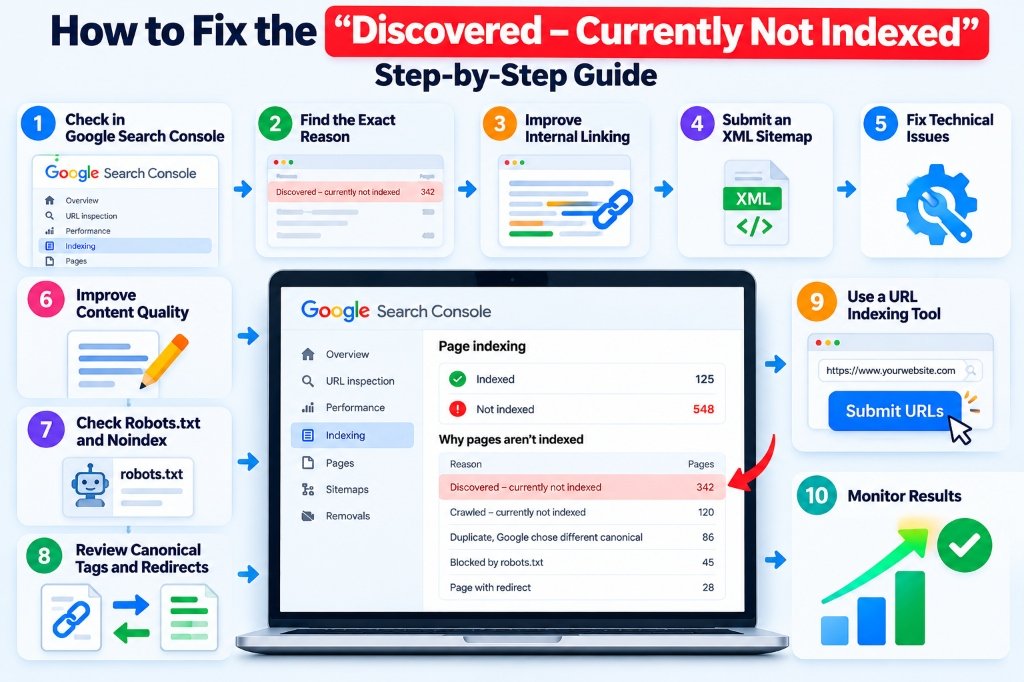
📷 Step-by-Step Guide: 10 Ways to Fix Discovered – Currently Not Indexed in Google Search Console
What Does “Discovered – Currently Not Indexed” Mean?
“Discovered – currently not indexed” is a status in Google Search Console indicating that Google knows the URL exists but has not yet crawled it for indexing at the time reflected in the report.
Google may discover a URL through an XML sitemap, internal links, external links, or other available signals. Discovery does not mean Google has already downloaded or evaluated the page.
For example, imagine you publish a blog post called “How to Improve Website Indexability.” You add it to your sitemap, but the post does not appear in Google Search. In Search Console, its URL may show the discovered-but-not-indexed status.
This tells you that Google has learned about the URL, but the next step—crawling—has not yet occurred.
Does this mean Google rejected my content?
Not necessarily.
The status does not by itself confirm that your content is poor, duplicated, or technically incorrect. Google may simply not have crawled the URL yet. However, if the problem persists across many pages, it is worth investigating the website's technical health, URL structure, internal links, and overall content strategy.
Is this the same as “Crawled – currently not indexed”?
No. These statuses describe different situations.
| Search Console status | Meaning | What to investigate |
|---|---|---|
| Discovered – currently not indexed | Google knows about the URL but has not yet crawled it for indexing | Discovery, internal links, server availability, URL volume |
| Crawled – currently not indexed | Google crawled the URL but has not included it in the index | Content usefulness, duplication, canonical signals, indexing directives |
| Excluded by noindex | Google encountered a noindex directive | Whether the exclusion is intentional |
| Blocked by robots.txt | Crawling is restricted by robots.txt | Whether the URL should be crawlable |
| Page with redirect | The URL redirects elsewhere | Redirect destination and canonical URL strategy |
Why Does Google Discover a URL but Not Index It?
There is no single cause that explains every discovered-but-not-indexed URL. Google's crawling systems decide which URLs to crawl and when, based on multiple factors.
Some common areas to investigate include:
- A newly launched website with limited discovery signals.
- Important pages with few internal links.
- An excessive number of URLs generated by filters or parameters.
- Server instability or intermittent errors.
- An inaccurate sitemap containing unnecessary URLs.
- Pages that provide little unique value compared with other pages.
- Confusing canonical or redirect configurations.
- A website structure that makes important pages difficult to reach.
A page can be technically accessible and still remain undiscovered by Google's crawler at a particular point in time. Equally, a URL may be discovered through a sitemap but have little internal context explaining its importance.
The right approach is to inspect the affected URLs, identify patterns, and fix issues that you can control.
10 Ways to Fix Discovered – Currently Not Indexed
1. Inspect the URL in Google Search Console
The first step is to understand what Google reports about the specific URL.
Open Google Search Console and select the correct website property. Enter the affected URL in the URL Inspection tool.
Review the available information about the URL, including its indexing status and any reported issues. If a live test is available, use it to investigate whether Google can access the current page.
Check that you are inspecting the exact URL you intend to index. For example, these may be treated as different URLs:
https://example.com/blog/article/https://example.com/blog/articlehttps://www.example.com/blog/article/
Your website's canonical and redirect strategy should determine which version is preferred.
What to do next:
- Record the affected URL.
- Note its reported status.
- Check the page's accessibility.
- Look for patterns among other affected URLs.
- Fix any identified technical problems before requesting indexing.
If many URLs share the same status, investigate the common template, directory, or URL pattern rather than treating every URL as an unrelated problem.
Google Search Console is the primary starting point for diagnosing Google-specific indexing information. A third-party URL indexing tool can complement your workflow, but it should not replace the information available from Google's own tools.
2. Improve Internal Linking
Internal links help search engines discover URLs and understand how pages relate to one another.
If you publish a blog post but never link to it from another page, the URL may have fewer discovery signals than an important article linked from your navigation or a relevant content hub.
For example, if your website publishes articles about SEO, create useful connections between related topics:
- Google Search Console indexing errors.
- Website indexability checks.
- XML sitemap troubleshooting.
- Technical SEO audits.
- URL indexing workflows.
Link between these articles when doing so helps the reader. Use descriptive anchor text that explains the destination instead of repeating the same exact keyword in every link.
How to improve internal links:
- Link to important new pages from relevant existing articles.
- Add new articles to appropriate category or topic pages.
- Check for orphan pages with no meaningful internal links.
- Fix broken internal links and redirect chains.
- Keep your navigation structure understandable.
Do not add hundreds of irrelevant links just to increase the number of links pointing to a URL. The objective is to make useful content easy to discover.
3. Submit an Accurate XML Sitemap
An XML sitemap helps search engines discover URLs that you consider important. It is particularly useful for larger websites, frequently updated websites, and sites with complex navigation.
However, sitemap submission does not guarantee that Google will crawl or index every URL listed in the file.
A sitemap can be less effective if it includes redirected URLs, broken pages, duplicate versions, or pages that you do not want indexed.
How to fix sitemap-related problems:
- Open your sitemap in a browser or inspect it with an XML Sitemap Extractor.
- Confirm that it loads successfully.
- Review whether it contains the correct canonical URLs.
- Remove unnecessary URL variations.
- Exclude pages that should not be indexed.
- Submit the sitemap in Google Search Console.
- Monitor the reported sitemap status.
If you use WordPress with an SEO plugin, review the sitemap configuration to ensure that relevant post types and public pages are included.
For large websites, a sitemap index can reference multiple sitemap files. Organize these files so that problems can be traced to the appropriate content type.
Only include URLs that you genuinely want search engines to discover and potentially index. Do not change modification timestamps artificially to make old content appear new.
4. Check Website Speed and Server Availability
Google needs to access your website to crawl its pages. If your server frequently times out, returns errors, or becomes unavailable, crawling can be affected.
For example, a page may work when you open it manually but return a server error during periods of heavy traffic. A hosting limitation, application error, database problem, or security configuration could be responsible.
What to check:
- HTTP response codes.
- Server error logs.
- Request timeouts.
- Hosting resource limits.
- CDN and firewall configuration.
- Availability during high traffic.
- Whether important URLs return the expected content.
A page that exists and is intended for search results should generally return an appropriate successful response, often 200 OK.
Do not use a fake successful response for pages that do not exist. Deleted content should return an appropriate response, such as a genuine 404 or 410, unless there is a relevant replacement to which it should redirect.
Reliable hosting is useful for both users and search engines. However, a faster website is not automatically indexed; content and other technical factors still matter.
5. Reduce Unnecessary URL Variations
Large websites sometimes generate many URLs through tracking parameters, filters, sorting options, calendars, internal search results, and product variations.
For example, an online store might generate multiple URLs for the same product because of different filter combinations or tracking parameters.
If these URLs contain substantially similar information, they may create unnecessary complexity for crawling and indexing.
How to address the problem:
- Identify URL patterns generating unnecessary variations.
- Determine which versions should be indexable.
- Use canonical tags where appropriate.
- Redirect obsolete or duplicate URLs when a suitable destination exists.
- Review how filters and parameters generate pages.
- Ensure internal links point to the preferred URL.
- Keep the sitemap focused on canonical URLs intended for search results.
Avoid blocking URLs indiscriminately. Some filtered or parameter-based pages may be useful and deserve a deliberate indexing strategy.
Also remember that canonical tags are signals, not an absolute guarantee. Google may select a different canonical URL if other signals suggest another version is preferable.
6. Improve Content Quality and Original Value
Technical accessibility is important, but it is not the only factor in an effective indexing strategy.
If your website publishes many pages with almost identical content, little useful information, or minimal differentiation, the overall URL inventory may contain pages that provide limited value to visitors.
For example, publishing separate articles that merely replace “website indexing tool” with “URL indexing tool” while repeating the same information may not be as useful as creating one comprehensive guide and several genuinely distinct supporting articles.
How to improve your content:
- Answer the searcher's question directly.
- Explain concepts accurately.
- Include original examples and useful steps.
- Remove repetitive paragraphs.
- Consolidate overlapping articles where appropriate.
- Make each page's purpose clear.
- Add relevant evidence, screenshots, or demonstrations when they provide genuine value.
There is no minimum word count that guarantees indexing. A concise page can be valuable if it fully answers a specific question, while a long article can still be unhelpful if it repeats the same information.
Do not add words merely to reach a target length or force a keyword into every paragraph. Write for people first and optimize the page's structure naturally.
7. Review Robots.txt and Noindex Directives
Robots.txt and noindex directives perform different functions.
A robots.txt rule primarily controls crawling. A noindex directive tells search engines that support it not to include a page in their search results after the directive is crawled and processed.
An unintended configuration can create indexing problems, particularly after a website redesign or migration.
For example, a development website may have been configured to block crawling, and that rule may accidentally remain after the website goes live.
What to do:
- Open the website's
robots.txtfile. - Review whether important directories are blocked.
- Inspect the affected page's HTML for meta robots directives using a Google Indexability & Noindex Checker.
- Check relevant HTTP response headers for
X-Robots-Tag. - Review SEO plugin and CMS settings.
- Remove restrictions that are not intended for public pages.
- Recheck the URL after the changes are deployed.
Do not assume that a noindex directive is necessarily the cause of the discovered-but-not-indexed status. Since that status means Google has not yet crawled the URL for indexing, the directive may not have been seen. Nevertheless, checking these settings can prevent the next crawl from encountering another obstacle.
If a URL is blocked by robots.txt, Google may be unable to crawl it to read its noindex directive. Correct the configuration according to your intended crawling and indexing strategy.
8. Check Canonical Tags and Redirects
Canonical tags help search engines identify the preferred version of pages that are duplicate or substantially similar.
Suppose you have two versions of a service page. If the page you want indexed points its canonical tag to another URL, Google may treat the other URL as the preferred version.
Redirects can also affect which URL should be inspected and indexed.
How to troubleshoot:
- Inspect the canonical tag on the affected page.
- Compare the declared canonical with the preferred URL.
- Check whether the page redirects.
- Review the final destination of the redirect.
- Make sure internal links use the correct URL.
- Ensure that sitemap entries are consistent with the canonical strategy.
If a page should be indexed independently, its canonical configuration should reflect that intent. If it is a duplicate, consider consolidating it into the preferred page.
Do not automatically make every page self-canonical without first understanding whether the URLs genuinely represent separate content.
9. Strengthen Website Structure and Crawlability
A well-organized website helps visitors and search engines understand the relationship between pages.
Important pages should not be hidden several layers deep without useful internal links. Visitors should be able to navigate to important content through logical categories, navigation, and related resources.
For example, an SEO website could organize its content around topic groups such as technical SEO, Google Search Console, URL auditing, and content optimization.
Each group can link to relevant guides and tools.
Practical improvements:
- Create logical categories.
- Link important pages from relevant hubs.
- Avoid unnecessary redirect chains.
- Keep navigation links crawlable.
- Fix broken internal links.
- Ensure the main content is accessible.
- Remove or consolidate unnecessary pages.
If your website uses JavaScript, confirm that the main content and navigation can be accessed by Google. JavaScript websites can be indexed, but implementation problems may prevent Google from seeing the expected content.
The objective is not to make every page equally important. It is to help users and search engines identify the pages that matter most.
10. Monitor Results and Request Indexing When Appropriate
Once you have investigated and corrected the underlying issues, review the URL in Google Search Console again.
For eligible URLs, you can use the URL Inspection tool to request indexing. This can prompt Google to consider recrawling the URL, but it does not guarantee that the page will be crawled or included in the index.
Avoid repeatedly submitting the same unchanged URL in the hope that more requests will force indexing.
For websites with many URLs, use a repeatable monitoring process.
Record:
- The affected URL.
- Its original Search Console status.
- The technical or content problem identified.
- The fix applied.
- The date of the change.
- The subsequent reported status.
This approach helps you identify whether a problem affects a single page, a template, a directory, or the entire website.
If the issue persists, investigate the specific URL again instead of assuming that every page needs the same fix.
How to Use Google Search Console to Diagnose Indexing Issues
Google Search Console is an essential tool for investigating Google Search visibility.
Step 1: Select the correct property
Open Search Console and choose the property that represents your website. Confirm the protocol and hostname so that you do not inspect a different URL version by mistake.
Step 2: Open URL Inspection
Enter the exact URL you want to investigate.
Review the information available about the URL's reported indexing status and any detected issues.
Step 3: Check the live URL when appropriate
If available, run a live test to investigate whether Google can access the current page.
A successful live test does not prove that the URL is indexed. It indicates that the current page passed the checks covered by that test.
Step 4: Review the Page Indexing report
Look for patterns among affected pages. Are all URLs in one directory affected? Are only new blog posts affected? Do several pages share the same template?
Patterns often help identify the root cause more quickly than inspecting unrelated URLs one by one.
Step 5: Apply the relevant fix
Correct technical problems, improve internal linking, review the sitemap, or improve the page where necessary.
Step 6: Monitor the result
Allow time for Google to process the changes. Search Console reports can take time to reflect updated information.
Official resource: https://search.google.com/search-console/
Can a URL Indexing Tool Fix Discovered – Currently Not Indexed?
A URL indexing tool can support an SEO workflow, but it is important to understand its limitations.
Some tools help check technical URL properties. Others provide bulk URL processing, submission workflows, or reporting features. Their actual capabilities vary.
A tool may help you organize large URL lists or manage supported submission operations. It cannot automatically fix every underlying cause of the discovered-but-not-indexed status.
For example, a tool cannot make an intentionally blocked page suitable for indexing simply by submitting its URL. It cannot guarantee that Google will index duplicate content, and it cannot replace an investigation into server errors or canonical problems.
Where does 1ClickIndexer fit?
1ClickIndexer is a platform you can evaluate for URL submission and indexing-related workflow management.
If you manage multiple URLs, review the platform's available features, current pricing, usage limits, supported processing methods, and API documentation before choosing a plan.
A sensible workflow is to:
- Identify URLs with indexing problems.
- Check their technical accessibility.
- Fix problems that you can control.
- Use an appropriate submission or processing workflow when relevant.
- Monitor Google-specific indexing information in Search Console.
Keep submission results separate from confirmed indexing results. A successfully processed URL is not necessarily indexed by Google.
How to Handle Bulk URL Indexing Problems
If hundreds or thousands of URLs show the same status, manually investigating every URL may be inefficient.
Instead, look for patterns.
Group URLs by page type
Separate blog posts, product pages, category pages, service pages, and parameter-based URLs.
If all pages in one group share the same problem, investigate the template or configuration that generates them.
Identify unnecessary URLs
Review duplicate pages, tracking parameters, filter combinations, and obsolete URLs. Determine which URLs should remain indexable.
Prioritize important pages
Focus on pages that serve a clear purpose and are valuable to visitors. Examples include key service pages, original research, useful product pages, and comprehensive guides.
Audit technical settings in bulk
A website crawler or bulk URL indexability checker can help identify recurring response codes, canonical issues, noindex directives, and internal linking problems.
Use processing tools where appropriate
A bulk URL indexing tool or dedicated processing service may help manage URL lists if its features match your needs. Confirm what each action means and what status the platform actually reports.
Monitor a sample before scaling
When making a large technical change, test a representative group of URLs first. Review the results and confirm that the fix behaves as intended before applying it across the entire site.
This process helps prevent a small configuration mistake from affecting thousands of pages.
Common Mistakes to Avoid
Repeatedly submitting the same URL
More submissions do not guarantee faster indexing. Fix the underlying problem and request indexing when appropriate.
Treating every excluded URL as an error
Some pages should not be indexed, including certain duplicate, private, or intentionally excluded URLs. Review the purpose of each page before trying to make it indexable.
Ignoring internal links
A sitemap is useful, but relevant internal links also help discovery and navigation.
Publishing many near-identical pages
Creating more pages does not necessarily create more search visibility. Focus on distinct user needs and useful content.
Confusing indexing with ranking
An indexed page can still rank poorly or receive no traffic. Ranking requires a broader SEO strategy.
Assuming a third-party tool guarantees results
Always check whether a service reports submission, processing, crawling, or confirmed indexing. These are different outcomes.
Frequently Asked Questions
1. What does Discovered – Currently Not Indexed mean?
It means Google knows about the URL but has not yet crawled it for indexing at the time reflected in Search Console. It does not automatically mean that the page has a penalty or will never be indexed.
2. How do I fix Discovered – Currently Not Indexed?
Inspect the URL in Google Search Console, check server availability and crawlability, review internal links and sitemap accuracy, and remove unnecessary URL variations. Improve the page where needed and request indexing when appropriate.
3. How long does it take to fix this issue?
There is no guaranteed timeline. Google may crawl a URL relatively quickly, take longer, or decide not to index it. Monitor Search Console and focus on resolving problems you can control.
4. Is Discovered – Currently Not Indexed a Google penalty?
No. This status alone does not indicate a penalty. It indicates that the URL has been discovered but has not yet been crawled for indexing.
5. Why is Google not indexing my page even after I submit a sitemap?
A sitemap helps Google discover URLs but does not guarantee crawling or indexing. Check internal links, server availability, URL duplication, and whether the page provides useful content.
6. Should I request indexing after fixing the issue?
You can request indexing for an eligible URL through Search Console after making meaningful changes. However, the request does not guarantee crawling or indexing.
7. Can a URL indexing tool fix the problem automatically?
A tool may help with supported submission workflows or technical checks. It generally cannot automatically resolve every issue involving content quality, duplicate URLs, server errors, or incorrect canonical configuration.
8. Can 1ClickIndexer guarantee that Google will index my page?
You should not assume that any third-party tool can guarantee Google's indexing decision. Review 1ClickIndexer's current documentation to understand its actual features and the results it reports.
9. What is the difference between Discovered and Crawled – Currently Not Indexed?
“Discovered” means Google knows about the URL but has not yet crawled it for indexing. “Crawled” means Google has crawled the URL but has not included it in the index at the time of reporting. The second status calls for closer examination of the page's content and indexing signals.
10. Can poor content cause indexing problems?
Content that provides little unique value may contribute to a page not being indexed, but the discovered status alone does not prove that content quality is the cause. Investigate crawling and technical factors first, then assess the page's usefulness and originality.
11. Should I remove URLs that are not indexed?
Not automatically. Some URLs may be important and need troubleshooting. Others may be duplicates, unnecessary variations, or pages that are not intended for search results. Decide based on each URL's purpose.
12. Can internal linking help Google discover pages?
Yes. Relevant internal links help search engines discover URLs and understand how pages relate to each other. They are an important part of a clear website structure.
13. Does website speed affect indexing?
Server availability and reliable responses can affect crawling. Improving performance is useful, but speed alone does not guarantee that a URL will be indexed.
14. Can I fix hundreds of URLs at once?
Sometimes. If many URLs share the same cause, correcting a template, sitemap configuration, or URL pattern may resolve the common problem. Verify the fix on representative pages before scaling it across the site.
15. What is the best tool for checking Google indexing issues?
Google Search Console is the primary source for inspecting Google-specific indexing information for a verified property. Technical crawlers and other SEO tools can complement it by helping identify website problems.
Conclusion
The “Discovered – currently not indexed” status can be frustrating, but it is a signal to investigate—not a reason to panic.
Start by inspecting the affected URLs in Google Search Console. Check server availability, URL structure, internal linking, sitemap accuracy, and technical crawling settings. Make sure each page serves a clear purpose and provides useful information.
If many URLs are affected, identify common patterns and correct the underlying problem rather than repeatedly submitting every URL.
A URL indexing tool may help organize your workflow, especially when managing large URL lists, but it should complement—not replace—technical SEO and Google Search Console monitoring.
If you are evaluating a dedicated workflow platform, explore 1ClickIndexer and review its current features, plans, and documentation to determine whether it meets your requirements.
Official Resources
For the most reliable technical guidance, consult Google's documentation: